Spec-Driven Development with Google Antigravity: Building WireUp Without Vibe Coding
How I built a browser-based wireframe editor using spec-driven development with Google Antigravity and OpenSpec — proving that AI-assisted engineering works best when you never resort to vibe coding.
This isn’t a post about a wireframe editor. It’s a post about how I built one — and what it taught me about AI-assisted software engineering.
When Google Antigravity launched, I wanted to put it to a real test. Not a todo app. Not a landing page. Something with enough complexity to stress-test the tooling: canvas rendering, interactive mouse handling, connector algorithms, grouping systems, AI integration, and a full property editor.
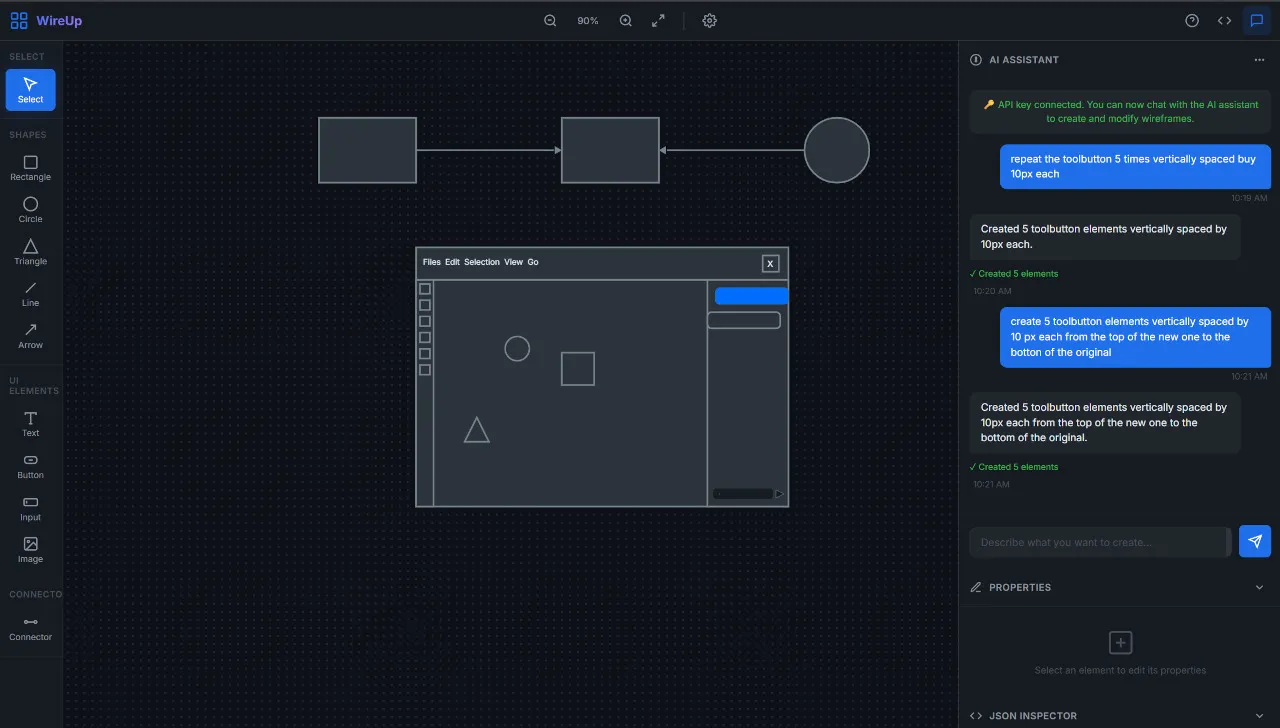
So I built WireUp — a browser-based wireframe editor with an AI copilot. But WireUp was the vehicle. The real experiment was this:
Can you build a non-trivial application with an AI coding assistant and never resort to vibe coding?
The answer is yes. And spec-driven development is how.
What Is Vibe Coding (And Why I Avoided It)
“Vibe coding” is the practice of throwing prompts at an AI, accepting whatever comes out, tweaking until it seems to work, and moving on. It’s fast. It’s satisfying. And it produces codebases where nobody — not even the AI — can explain why things are the way they are.
I’ve seen what vibe-coded projects look like after a few weeks: tangled logic, duplicate functions, edge cases that blow up on contact, and no documentation beyond the chat history.
I wanted the opposite. Every feature in WireUp would be:
- Explored to understand the problem space
- Proposed with a clear rationale
- Designed with documented trade-offs
- Specified with formal acceptance criteria
- Implemented task by task
- Verified through automated tests
- Archived with full decision history
This is what spec-driven development looks like with AI.
The Tooling: Google Antigravity + OpenSpec
Google Antigravity
Antigravity is Google’s agentic AI coding assistant. It’s not a chatbot that generates code snippets — it’s an autonomous agent that can:
- Read and reason about your entire codebase
- Propose architectural changes and ask for approval before executing
- Execute multi-file edits with precise line targeting
- Launch a browser subagent that performs real user interactions (clicking, dragging, typing) and captures screenshots for verification
- Track context across long sessions spanning dozens of features
For WireUp, I used Antigravity in Planning mode with the Claude Opus 4.6 (Thinking) model. This combination is important:
- Planning mode means Antigravity doesn’t immediately jump into code. For any non-trivial request, it first researches the codebase, creates an implementation plan, and asks for your approval before making changes. This aligns perfectly with spec-driven development — the AI is forced to think before it acts, just like the workflow demands.
- Claude Opus 4.6 (Thinking) is a reasoning model that shows its chain of thought. This means you can see why the AI made specific architectural decisions, not just the final output. When Antigravity proposed using bidirectional
parentId+children[]for grouping, I could read its reasoning about O(1) lookups and verify the logic before a single line was written.
What makes it different from a copilot autocomplete is the agency. You describe what you want at a high level, and it researches, plans, implements, and verifies — but always within the boundaries you set. Here, you are both the Human-in-the-Loop and the Human-on-the-Loop: not only making interventions when needed but also observing each step.
OpenSpec
OpenSpec is a specification-driven change management system that runs alongside Antigravity. It creates a structured openspec/ directory in your project that acts as a living registry of your software’s capabilities, decisions, and history.
openspec/
├── specs/                          # Living specifications per capability
│   ├── canvas-navigation/
│   ├── element-interactions/
│   ├── properties-panel/
│   └── ...
└── changes/
    ├── fix-grouping/               # Active change being worked on
    │   ├── proposal.md             # What & why
    │   ├── design.md               # How (decisions + trade-offs)
    │   ├── specs/                  # Delta specs (acceptance criteria)
    │   │   └── element-interactions/
    │   │       └── spec.md
    │   └── tasks.md                # Implementation checklist
    └── archive/                    # Completed changes with full history
        ├── 2026-04-08-wheel-scroll-pan/
        ├── 2026-04-08-fix-connectors/
        └── ...
The system exposes four commands — each representing a distinct mode of working. Understanding when to use each is the key to the entire workflow.
The Four Commands
🔍 /opsx-explore — Think Before You Build
What it does: Enters an open-ended exploration mode. You’re not building anything — you’re investigating, brainstorming, and clarifying requirements. Antigravity becomes a thinking partner, not a code generator.
When to use it: At the very start, when an idea is vague, when you hit a bug you don’t understand, or when you need to compare approaches before committing to one.
What it can do:
- Investigate your codebase — read files, trace dependencies, map architecture
- Compare approaches with trade-off tables and ASCII diagrams
- Challenge your assumptions and surface hidden risks
- Create OpenSpec artifacts (proposals, designs) if insights crystallize — because capturing thinking is exploration
What it cannot do: Write application code. This is enforced. If you try to implement something in explore mode, it reminds you to exit and create a proper change first.
There are no required outputs. Explore mode might flow into a proposal, result in artifact updates, or just give you clarity to move on. Sometimes the thinking IS the value.
Used in WireUp: When I discovered the grouping bug (dragging a group moved only a dashed rectangle), I was mid-implementation on another feature. Antigravity immediately investigated: read
interactions.js, traced_groupSelected(), found that children had noparentId, the move handler didn’t cascade, hit testing didn’t resolve to the parent, and the renderer always drew the dashed box. Four root causes identified in under a minute — all before any proposal was created.
📋 /opsx-propose — Define What You’re Building
What it does: Creates a structured change with all the artifacts needed before implementation begins. You describe what you want in plain language; OpenSpec produces four artifacts in dependency order:
proposal.md— The what and why: rationale, capabilities affected, files impacteddesign.md— The how: architectural decisions with alternatives considered and explicitly rejectedspecs/— The acceptance criteria: formal Given/When/Then scenarios defining exactly what “done” meanstasks.md— The implementation plan: granular, checkable task list mapping each task to specific files
When to use it: When you know what you want to build and you’re ready to formalize it.
How it works under the hood:
# Creates the change directory with the OpenSpec schema
openspec new change "fix-grouping"

# Checks which artifacts are needed and their dependency order
openspec status --change "fix-grouping" --json

# Gets instructions for each artifact (template, rules, dependencies)
openspec instructions proposal --change "fix-grouping" --json
openspec instructions design --change "fix-grouping" --json
openspec instructions specs --change "fix-grouping" --json
openspec instructions tasks --change "fix-grouping" --json
Each artifact is created in dependency order — the design reads the proposal, the specs read the design, the tasks read the specs. Nothing is created in isolation. Every artifact inherits context from the ones before it.
The proposal adapts to feedback. During the properties panel proposal, I added a comment mid-way: “we should add a name field so users can give elements meaningful names.” Antigravity updated the proposal, design, and tasks to include the name field — a model change in models.js plus a new input in the panel HTML — without losing any of the existing structure.
Used in WireUp for every feature: Wheel scroll/pan, fix connectors, inspector sync, AI connector support, marquee selection, fix grouping, and properties panel — all started with
/opsx-propose. In total, 7 changes proposed, each with 4 artifacts.
✅ /opsx-apply — Implement, Task by Task
What it does: Reads the change’s artifacts (proposal, design, specs, tasks) and implements the tasks one at a time, marking each checkbox complete as it goes. This is the only command where application code gets written.
When to use it: After /opsx-propose has created all artifacts and you’re ready to build.
How it works:
# Checks which change to implement and reads its schema
openspec status --change "fix-grouping" --json

# Gets implementation instructions: context files, progress, task list
openspec instructions apply --change "fix-grouping" --json
Then it reads all context files (proposal, design, specs, tasks) and implements each task sequentially:
## Implementing: fix-grouping
Progress: 4/10 tasks

Working on task 3.3: Fix move handler — cascade delta to children
...editing interactions.js lines 260-280...
✓ Task complete

Working on task 3.4: Fix hit testing — resolve child clicks to parent group
...editing interactions.js lines 49-63...
✓ Task complete
Key discipline: Every task maps to specific files and specific changes. There’s no “refactor everything while I’m here.” Each task is a focused, atomic unit of work. The checkbox gets marked [x] only after the code is written and the file is saved.
Verification is built into the task list. The last tasks are always verification steps. Antigravity launches a browser subagent that performs the actual user actions described in the spec — clicking tools, dragging elements, pressing keyboard shortcuts, taking screenshots at each step — and confirms the behavior matches the acceptance criteria.
Pausing and resuming. If implementation reveals a design issue, /opsx-apply pauses and suggests updating the artifacts before continuing. You can also interrupt mid-way — I did this during the marquee feature when I noticed the grouping bug — and resume with /opsx-apply later. It picks up right where it left off by checking which tasks are still [ ].
Used in WireUp: I ran
/opsx-apply7 times across the project, implementing a total of ~65 tasks. The largest wasinspector-sync-and-ai-connectors(12 tasks across 3 files). The smallest wasmarquee-selection-visual(5 tasks across 3 files). Every one completed with passing verification.
📦 /opsx-archive — Preserve and Move On
What it does: Archives a completed change with its full decision history, syncs delta specs to the main specs directory, and cleans up.
When to use it: After implementation is complete and verified. This is the “ship it” moment.
How it works:
# Checks artifact and task completion — warns if anything is incomplete
openspec status --change "fix-grouping" --json

# Syncs delta specs to the living specs directory
# Change specs (openspec/changes/fix-grouping/specs/element-interactions/spec.md)
# merge into the main spec (openspec/specs/element-interactions/spec.md)

# Moves the entire change directory to archive with a date prefix
mv openspec/changes/fix-grouping openspec/changes/archive/2026-04-08-fix-grouping
Why spec syncing matters: The main openspec/specs/ directory is always up to date. It represents the current truth of what your software can do. When you add a grouping spec via a change, archiving merges those scenarios into the living element-interactions spec. Future changes can read those specs and know what already exists.
Why archiving matters: The archive preserves the complete story of every feature — why choices were made, what alternatives were rejected, what the acceptance criteria were, and when it was completed. This is documentation that writes itself as a byproduct of the workflow.
Used in WireUp: At the end of the session, I archived all four completed changes in one batch:
Archived: inspector-sync-and-ai-connectors
Archived: marquee-selection-visual
Archived: fix-grouping
Archived: properties-panel

Specs synced: ai-connector-actions, inspector-live-sync,
              marquee-selection-visual, element-interactions,
              properties-panel
Clean slate. Five capabilities updated in the living specs. Full history preserved.
The Full Lifecycle: Tracing One Feature End to End
Let me trace the complete lifecycle of Fix Grouping — showing exactly which command was used at each step.
1. Discovery → /opsx-explore (implicit)
While testing the marquee selection feature (/opsx-apply marquee-selection-visual), I noticed the grouping was fundamentally broken. I left a comment mid-implementation:
“After selecting a ball and a rectangle and grouping them, I try to drag the group, but instead, a dashed rectangle is dragged.”
Antigravity didn’t just file a bug — it immediately investigated. Read interactions.js, found _groupSelected() creating a group element with children: [ids] but children having no back-reference. Read renderer.js, found _drawGroup() unconditionally rendering a dashed rectangle. Identified four distinct root causes in under a minute.
This is /opsx-explore in spirit — investigation and understanding before action.
2. Proposal → /opsx-propose fix-grouping
With the root causes understood, a structured change was created:
Proposal: Five bugs documented with root causes. Impact analysis across models.js, state.js, interactions.js, and renderer.js.
Design: Four architecture decisions, each with the alternative that was rejected:
| Decision | Alternative Rejected | Rationale |
|---|---|---|
Bidirectional parentId + children[] | Parent-only lookup | O(1) both directions without scanning |
| Absolute child positions | Relative to group origin | Avoids complexity in existing coordinate system |
| Hit test resolves child → parent | No change | Makes group behave as a single selectable unit |
| Draw group box only when selected | Always draw | Eliminates the visual bug — children render normally |
Specs: 5 formal scenarios defining exactly what “fixed grouping” means — including edge cases like “deleting a group deletes children.”
Tasks: 10 implementation items across 4 files.
3. Implementation → /opsx-apply fix-grouping
Antigravity read all four artifacts, then implemented each task:
- [x] 1.1 Add parentId field to createElement (models.js)
- [x] 2.1 Update removeElement() to cascade-delete children (state.js)
- [x] 2.2 Add getChildElements() helper (state.js)
- [x] 3.1 Fix _groupSelected(): set parentId on children (interactions.js)
- [x] 3.2 Fix _ungroupSelected(): clear parentId before removing (interactions.js)
- [x] 3.3 Fix move handler: cascade delta to all children (interactions.js)
- [x] 3.4 Fix hit testing: resolve child clicks to parent group (interactions.js)
- [x] 4.1 Fix _drawGroup(): only render when selected (renderer.js)
- [x] 5.1 Verify: group and drag → both elements move together ✓
- [x] 5.2 Verify: ungroup → elements become independent ✓
For task 5.1, a browser subagent:
- Opened
http://localhost:3000 - Added a rectangle and a circle to the canvas
- Used marquee selection to select both
- Pressed Ctrl+G to group
- Dragged the group — confirmed both elements moved together
- Pressed Ctrl+Shift+G to ungroup
- Dragged the rectangle — confirmed the circle stayed put
- Captured screenshots at each step
4. Archive → /opsx-archive
Change moved to openspec/changes/archive/2026-04-08-fix-grouping/. Delta specs merged into openspec/specs/element-interactions/spec.md. Full history preserved. Clean slate.
More Examples
Properties Panel: /opsx-propose → feedback → /opsx-apply
/opsx-propose — I described the panel I wanted. While reviewing the proposal, I gave feedback: “we should add a name to the object.” Antigravity updated the proposal, design, and tasks — the spec-driven workflow adapts without losing structure.
/opsx-apply properties-panel — 12 tasks: model change (name field), HTML markup (182 lines), CSS (300 lines using design tokens), controller class with debounced inputs and type-aware visibility, and main.js wiring. Verification: browser subagent selected a rectangle, confirmed panel populated, changed fill to red via hex input #FF0000, and verified the canvas element updated in real-time.
AI Connector Support: /opsx-propose → /opsx-apply
/opsx-propose — The AI needed to create connected workflows from a single prompt. The design doc documented the tempId system: the AI assigns temporary IDs (temp_1, temp_2), the ActionExecutor maintains a _tempIdMap during batch processing, and create_connector actions resolve temp_1 to the real element ID.
/opsx-apply inspector-sync-and-ai-connectors — 12 tasks. Rewrote the system prompt to include connector schema and tempId convention. Built _executeCreateConnector, _resolveId, and batch processing in the executor. All verified through browser testing.
What I Learned
Spec-driven development makes AI better, not slower
The common objection: “All that process will slow down the AI’s advantage!”
The opposite happened. Because every feature started with a clear proposal and spec, Antigravity produced cleaner implementations with fewer iterations. The specs acted as guardrails — the AI knew exactly what “done” meant.
Compare this to vibe coding, where you end up in a cycle of: generate → test manually → find a bug → prompt again → introduce a new bug → prompt again. That cycle is slower than getting it right the first time.
The four commands create a natural rhythm
After a few features, the workflow became second nature:
- Confused?
/opsx-explore— think it through - Clear?
/opsx-propose— formalize it - Ready?
/opsx-apply— build it - Done?
/opsx-archive— preserve it
Each command has a clear purpose and a clear boundary. You’re never in a mode where you shouldn’t be.
The spec archive is the real deliverable
At the end of this project, I have an openspec/ directory that reads like a project history:
- Why we chose orthogonal routing over curved for connectors
- Why elements use absolute coordinates even inside groups
- Why the AI prompt was rewritten to remove the
icontype - What the acceptance criteria were for every feature
This is documentation that writes itself as a byproduct of the workflow. No separate doc sprint needed.
AI didn’t replace engineering — it amplified it
Antigravity is remarkably capable. It can read an entire codebase, propose architectural changes, implement them across multiple files, and verify them with browser automation.
But none of that matters if you don’t know what you’re building. The spec-driven workflow forced me to articulate every feature before any code was written. The result was clarity — and clarity is what makes AI assistance effective.
The best AI-assisted code is the code you could explain without the AI.
Vibe coding has its place — but not here
I’m not against vibe coding for prototypes, throwaway scripts, or exploration. But for anything you’ll maintain, share, or build on — spec-driven is the way. It’s the difference between a sketch on a napkin and an architectural blueprint. Both have value. But only one scales.
The Result: WireUp
The product that came out of this experiment is genuinely useful:
- 10+ element types — rectangles, circles, triangles, text, buttons, inputs, images, lines, arrows, groups
- Canvas rendering — custom HTML5 Canvas 2D renderer with
requestAnimationFramedirty-checking - Smart connectors — orthogonal routing with proper arrowheads, selectable and deletable
- Marquee selection — dashed rectangle visual feedback during multi-select drag
- Full grouping — groups move, select, and delete as a unit
- Properties panel — name, transform, fill, stroke, corners, text, font, opacity, layer ordering
- AI copilot — OpenAI integration with workflow generation and batch element creation
- JSON inspector — Monaco Editor with bidirectional live sync
- Zero frameworks — Vanilla JS + Vite, under 200ms load time
It’s free, open-source, and MIT licensed.
🔗 GitHub: github.com/eonio/wireup
git clone https://github.com/eonio/wireup.git
cd wireup
npm install
npm run dev
Final Thought
The most valuable thing I built isn’t WireUp. It’s the openspec/ directory sitting next to it — a complete, traceable record of every design decision, every trade-off, and every verification that went into a working product.
That’s what spec-driven development gives you. Not just working software — but software you understand.
Questions, feedback, or want to discuss spec-driven AI development? Reach out at eonio.dev.